
What server-side tracking means for a Shopify store
Most store tracking starts in the browser. A pixel loads on the page, watches for events such as add to cart and purchase, and sends them to Meta or Google. That works until something in the browser gets in the way: an ad blocker, a privacy setting, a slow connection, or a shopper who closes the tab before the tag fires.
Server-side tracking sends the same events from a server instead of, or as well as, the browser. For a Shopify store that server is usually one of three things: Shopify itself (through an official sales channel app), a tag server you host, or an app that relays events for you. The ad platform receives an event either way. What changes is the route it takes and who controls the data on the way.
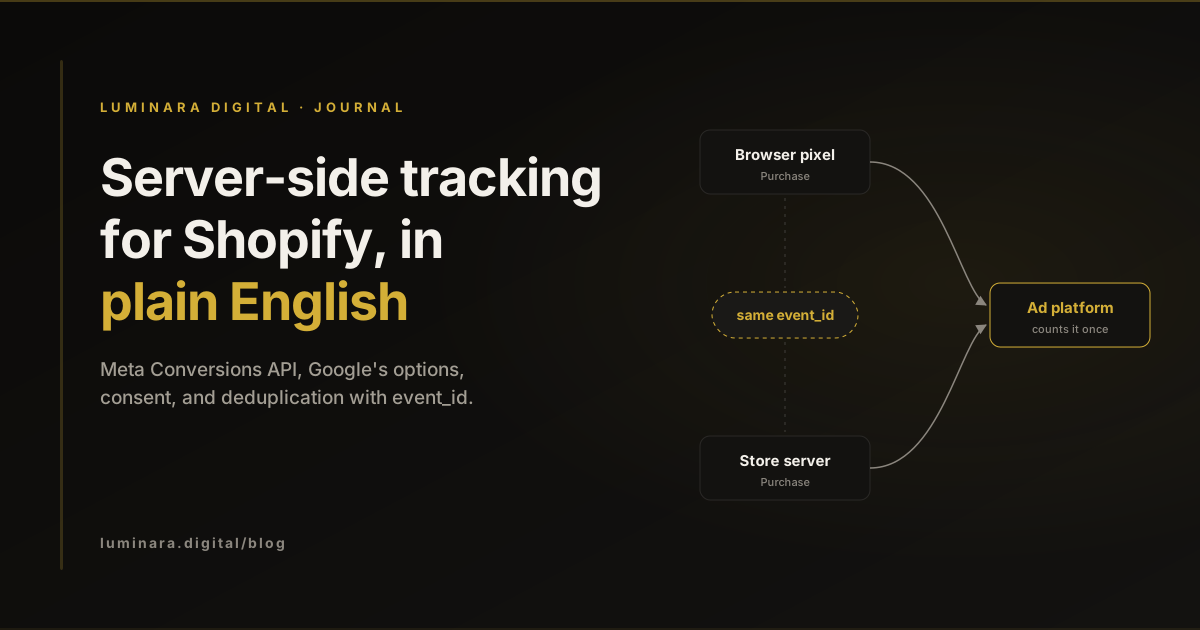
This post explains the options in plain English, what each one is good for, and where the limits are. If you want the short version: send purchases through both routes, give every event an ID so the platform can count it once, and respect consent on both routes.
The Meta Conversions API, and how Shopify connects it
Meta describes the Conversions API as a connection that sends marketing data from an advertiser's server, website platform, app or CRM to Meta. It does not replace the pixel. Meta's own best practices say to use it in addition to the Meta Pixel and to send the same events through both, which Meta calls a redundant setup.
On Shopify you rarely need to build this yourself. The Facebook & Instagram app has a customer data-sharing setting with three levels. Standard uses the pixel only, and Shopify notes that a browser ad blocker can stop the pixel sharing data. Enhanced adds the Conversions API alongside the pixel. Maximum adds Meta's newer ad technology on top of that. Shopify points out that server-to-server data cannot be blocked by browser-based ad blockers.
Server events carry customer details so Meta can match them to an account. Meta's customer information parameters page says fields such as email and phone must be normalised and hashed with SHA-256 before sending, while values such as the client IP address, user agent and the fbp and fbc cookie values must not be hashed. Meta scores how well these details match with Event Match Quality, a score out of 10 described on the same best practices page.
Google's options: server-side tagging, enhanced conversions, Measurement Protocol
Google has three separate tools that people often lump together as "server-side". They solve different problems.
Server-side tagging moves Google Tag Manager work onto a server container that runs on infrastructure you control. The browser sends one stream of data to your server, and your server decides what to forward to Google Analytics, Google Ads or other vendors. Google lists the benefits as control over how data is shaped and where it is routed. The trade-off is that you now run a server. Google's Cloud Run setup guide prices each server at about US$45 a month and recommends at least two instances to reduce data loss in an outage.
Enhanced conversions improve how Google Ads matches a conversion to an ad click by sending hashed first-party data, such as the email address entered at checkout. Google says the data is hashed with SHA256 before it is sent. For most Shopify stores this is the highest-value Google change, and it does not require a tag server.
The GA4 Measurement Protocol lets a server send events straight to Google Analytics. Google is clear that it is meant to augment automatic collection through the Google tag or Tag Manager, not replace it. Use it for events the browser never sees, such as a refund processed in the back office or a subscription renewal, rather than as a copy of every page view.
Deduplication: why event_id matters
If the pixel and the server both report the same purchase, the platform needs a way to know it is one purchase, not two. That is deduplication, and it is the part most setups get wrong.
Meta's deduplication guide says it treats a browser event and a server event as the same when the pixel's eventID matches the Conversions API's event_id and the event names match. Meta generally keeps the event it receives first, and only deduplicates events received within 48 hours of the first event with that ID. In practice this means the purchase event ID should come from something stable, such as the Shopify order ID, and both routes must use exactly the same value.
Google works differently. Google Analytics deduplicates purchase events with the same transaction ID on web streams, and warns that purchases sent with an empty transaction ID are all treated as one. The same rule applies: a stable order ID on every purchase event, whichever route sends it. If you add server events and your reported purchases suddenly jump while Shopify orders stay flat, check the IDs before you celebrate.
What server-side tracking fixes, and what it does not
Server-side tracking is useful plumbing. It is not a new source of customers, and it cannot change who clicked what. This table sets out what to discuss before any setup work starts.
Purchases missing because of ad blockers
- Does server-side help?
- Yes, for the server route
- Why
- Shopify notes server-to-server data is not blocked by browser ad blockers
Weak matching of conversions to ad clicks
- Does server-side help?
- Often
- Why
- Hashed customer details (Meta match quality, Google enhanced conversions) give the platform more to match on
Meta and Google both claiming the same sale
- Does server-side help?
- No
- Why
- Each platform still attributes by its own rules; deduplication only works inside one platform
Visitors who declined tracking
- Does server-side help?
- No, and it should not
- Why
- Consent applies to the server route as much as the browser route
A broken checkout or slow site
- Does server-side help?
- No
- Why
- Measurement reports on the store; it does not fix it
Consent and privacy for Australian stores
Moving tracking to a server does not move it outside privacy law. In November 2024 the OAIC published guidance on tracking pixels and privacy obligations. It asks businesses covered by the Privacy Act to do due diligence on the tools they install, configure them to collect the minimum personal information needed, avoid sending sensitive information, and explain pixel use in their privacy policy and collection notices. It says sensitive information should only be collected through a pixel with a person's express consent.
That point matters most for wellness and health brands. In June 2026 the Privacy Commissioner found that two health businesses breached the Privacy Act by using third-party tracking pixels on health-related websites to collect sensitive information and target visitors with ads without consent. If your product pages reveal something about a customer's health, think carefully about which events you send and what they contain.
On the technical side, Shopify's customer privacy settings include a cookie banner that stores can turn on in any region, and Shopify says pixels operate based on the consent obtained. Developers can read and set consent through the Customer Privacy API, and Shopify's web pixels run in a sandbox and wait for consent where it is required. Google's consent mode uses consent types including ad_storage, analytics_storage, ad_user_data and ad_personalization, so Google tags change behaviour based on the visitor's choice. Whatever you build on a server should read the same consent state, not bypass it.
A practical checklist
Work through these in order. Most Shopify stores can do the first five without a tag server.
- 01
Write down what you send today
List every pixel, app and tag that sends events, and which events each one sends. Duplicates usually start with two apps doing the same job.
- 02
Turn on the Conversions API through Shopify's Meta app
Set customer data sharing to Enhanced or Maximum, then check in Events Manager that browser and server purchases are both arriving.
- 03
Confirm deduplication
Purchase events from both routes should share one event_id and one event name, taken from the Shopify order.
- 04
Set up Google enhanced conversions
Send hashed checkout email and phone with the purchase conversion, and confirm the diagnostics in Google Ads.
- 05
Decide your consent position
Choose whether to show a banner, map it to Shopify's consent and Google consent mode, and update your privacy policy to describe the tools you use.
- 06
Only then consider a tag server
Server-side tagging is worth it when you need to control or trim data before vendors receive it, or when many vendors need the same events. Budget for hosting and upkeep.
- 07
Compare against Shopify orders every month
Platform purchase counts should sit close to real orders for the same period. A gap in either direction means something to fix.
Conclusion
Server-side tracking is less mysterious than it sounds. For most Shopify stores it means switching on the Conversions API through Shopify's Meta app, adding Google enhanced conversions, making sure every purchase carries one stable ID, and respecting consent on both routes. A hosted tag server comes later, if at all. Our tracking and GA4 service sets up server-side GA4 and the Meta Conversions API for Shopify stores, and if you would like a second pair of eyes on your current setup, get in touch.
Common questions
Meta recommends using the Conversions API in addition to the pixel, and on Shopify you can turn it on through the Facebook and Instagram app's data-sharing setting. You do not need a separate tag server for that.
It can recover events that the browser route missed and improve matching, so reported conversions may rise. It does not create sales. Always compare reported purchases with actual Shopify orders for the same period.
No. Consent and privacy obligations apply to the data, not the route it travels. The OAIC's guidance on tracking pixels applies to Australian businesses covered by the Privacy Act, and your server events should follow the same consent state as your browser tags.
Meta uses event_id, together with the event name, to match a browser event with a server event and count it once. GA4 uses transaction_id on purchase events to recognise the same transaction. Using the Shopify order ID for both keeps them consistent.
Sources
- Conversions API. Meta for Developers. Accessed .
- Best Practices: Conversions API. Meta for Developers. Accessed .
- Handling Duplicate Pixel and Conversions API Events. Meta for Developers. Accessed .
- Customer Information Parameters. Meta for Developers. Accessed .
- Facebook data sharing. Shopify Help Center. Accessed .
- Configuring customer privacy settings. Shopify Help Center. Accessed .
- Customer Privacy API. Shopify.dev. Accessed .
- About web pixels. Shopify.dev. Accessed .
- An introduction to server-side tagging. Google for Developers. Accessed .
- Set up server-side tagging with Cloud Run. Google for Developers. Accessed .
- About enhanced conversions. Google Ads Help. Accessed .
- [GA4] Minimize duplicate key events with transaction IDs. Google Analytics Help. Accessed .
- Measurement Protocol (Google Analytics 4). Google for Developers. Accessed .
- Consent mode overview. Google for Developers. Accessed .
- Tracking pixels and privacy obligations. Office of the Australian Information Commissioner. Accessed .
- Privacy Commissioner finds privacy breaches in third-party tracking pixel investigation. Office of the Australian Information Commissioner. Accessed .
Tags: ShopifyServer-side trackingMeta Conversions APIGoogle Tag ManagerEnhanced conversionsConsent modePrivacy